Using the App
This page walks through the operator-facing surfaces the plugin contributes beyond the standard CRUD list/detail views.
Action Required
/plugins/contracts/reports/action-required/ is a single page that answers "what do I need to do this week to avoid a renewal surprise?".
Contracts are bucketed into three priority tiers driven by a centralized rubric in priority.action_priority():
- URGENT —
auto_renew=TrueAND inside the notice window. The contract auto-renews on un-renegotiated terms unless action is taken. - WARNING — within 7 days of
end_date, OR inside the notice window without auto-renew. Lapse means termination. - HEADS UP — within the configured window but outside urgency bands.
Each row links to the contract detail page and to a direct edit shortcut. The window selector ranges from 14 to 365 days.
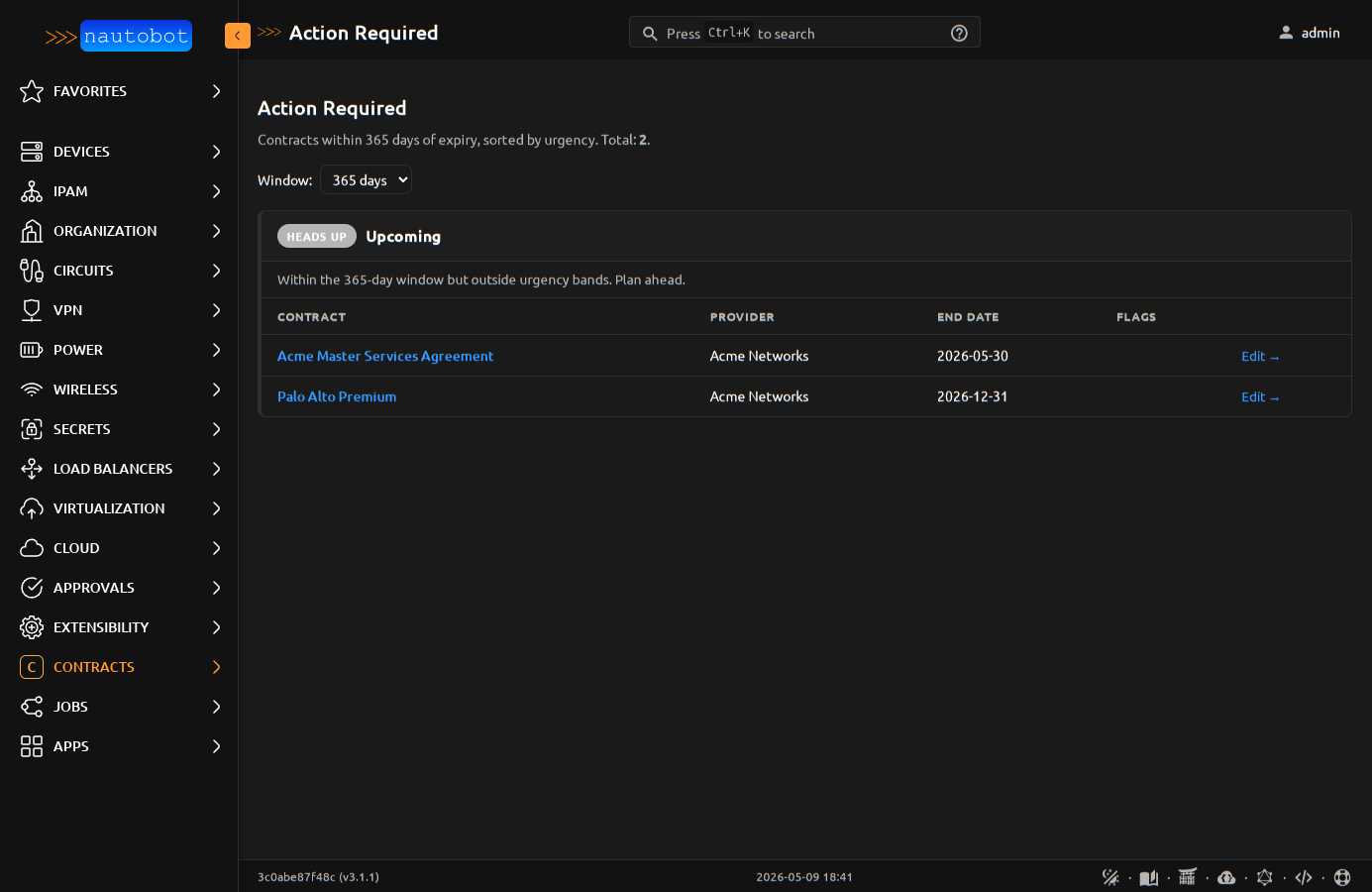
The same rubric drives the Action Required home dashboard panel and the Check upcoming renewals Job's severity classification — one source of truth keeps the three surfaces aligned.
Renewal Calendar
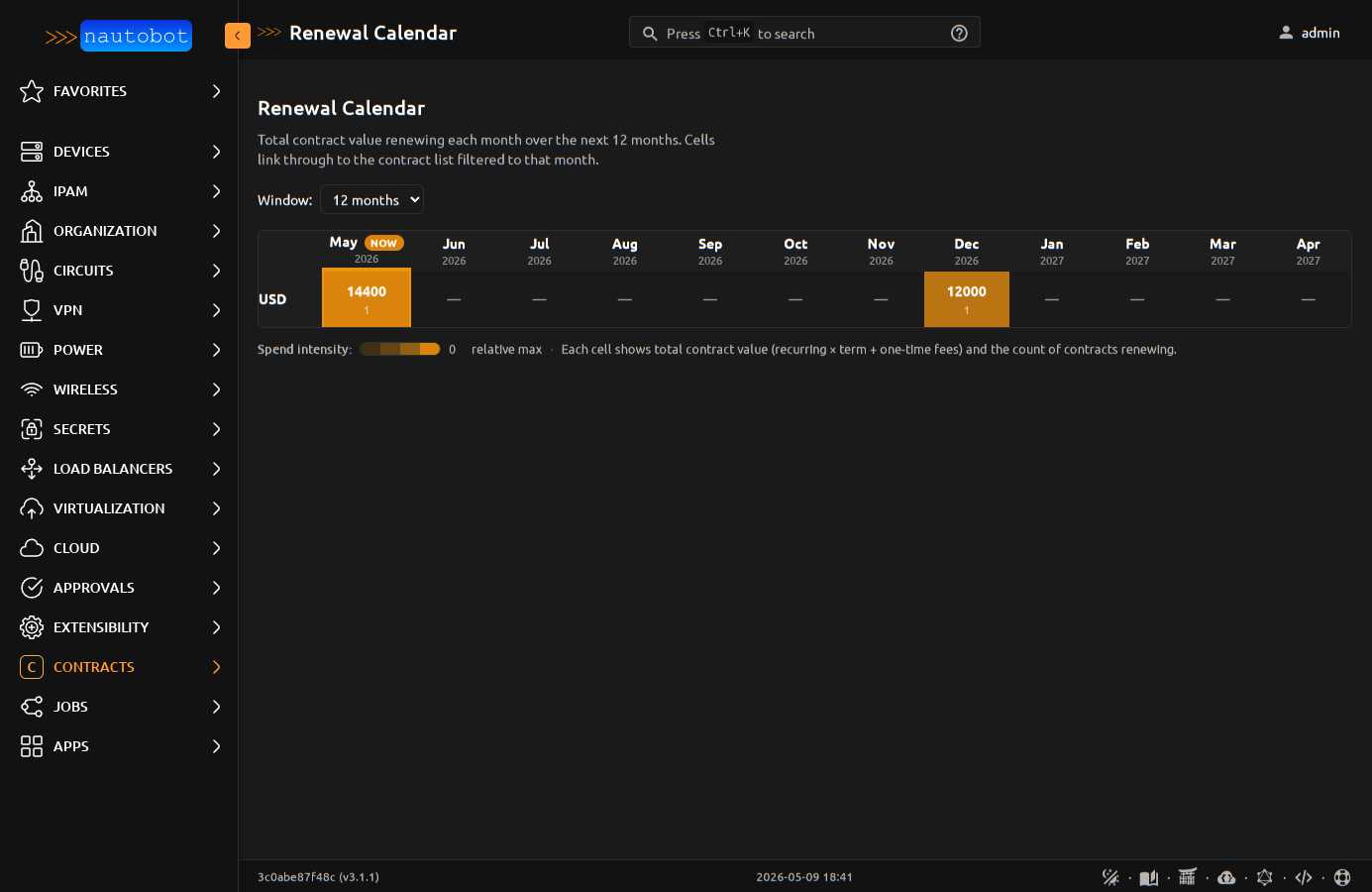
/plugins/contracts/reports/renewal-calendar/ is a forward-looking, month-by-month grid of contract renewals with cost density encoded as amber saturation. Operators see "March is a $400k month" at a glance and can click any cell to drill into the contract list filtered to that month + currency.
Key design properties:
- Per-currency rows. No FX conversion. USD and EUR contracts appear on separate rows.
- Single-hue saturation scale. Pale wash for light months, saturated for heavy months. Color encodes magnitude; numeric values are always visible.
- "NOW" badge on the current month's column header, plus amber rails on data cells in the current column. Two redundant signals so the indicator works in forced-colors mode and on printers.
- Click-through. Cells link to
/contracts/?end_date__year=YYYY&end_date__month=MM¤cy=XXXso the calendar is a starting point for deeper investigation. - Window selector (3/6/12/24/36 months).
- Print-friendly —
@media printstrips colors and adds borders for budget meetings.
Cost History
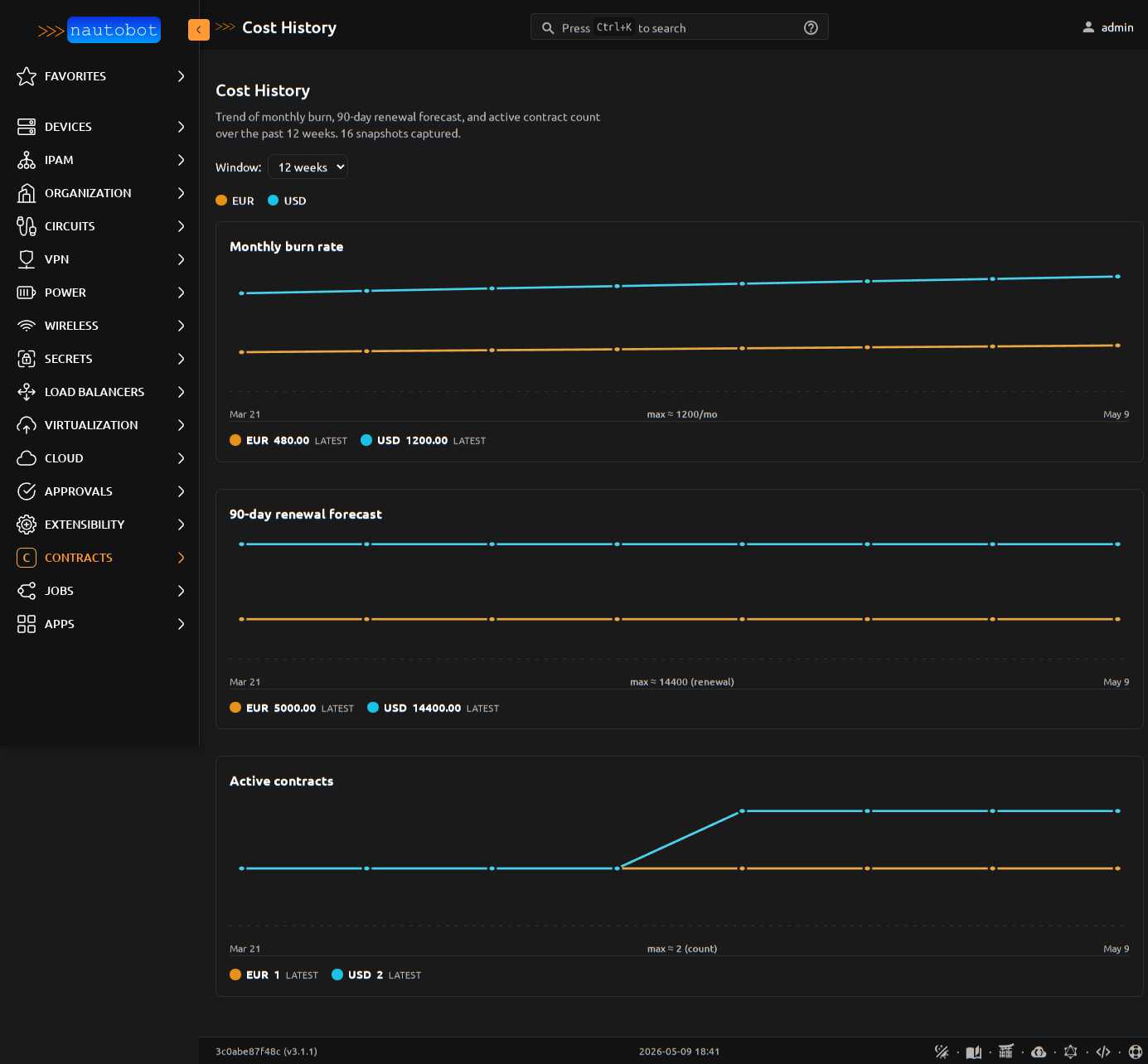
/plugins/contracts/reports/cost-history/ renders three time-series line charts (monthly burn, 90-day renewal forecast, active contract count), one line per currency, over a configurable window (4/12/26/52 weeks). Inline SVG — no JS chart library, prints natively, dark-mode aware.
Data comes from the CostSnapshot model. Schedule the Capture cost history snapshot Job weekly to feed the trend; on a fresh install the page renders an empty state pointing at the Job.
The Detect cost anomalies Job (also under Contracts) compares this week's snapshots to a configurable baseline (default 4 weeks ago) and emits a WARNING-level JobLogEntry whenever burn rate or 90-day renewal forecast moves by more than threshold_pct (default 20%) per currency. Wire a webhook to JobLogEntry creation to route into Slack / email / a ticket.
Cost Summary + Renewal Forecast Panels
The home dashboard contributes two cost panels (in addition to Action Required and Coverage Gaps):
- Cost Summary — current monthly burn rate per currency, annualized, top 5 vendors by spend
- Renewal Forecast — total renewal cost in 30 / 90 / 365 day windows, per currency
Both panels group by Contract.currency and never sum across currencies (the plugin doesn't do FX in v1).
Coverage Gaps
Devices with no active contract coverage — direct OR transitive (via Tenant, Location, Rack, etc.) — are surfaced in two ways:
- Coverage Gaps home dashboard panel showing the first 10 uncovered devices with location + tenant context
- Find devices without contract coverage Job that walks every Device and writes one
WARNINGlog line per uncovered device, plus an INFO summary
The transitive coverage helper (helpers.coverage_assignments) walks (self, tenant, location, rack, device) ancestry. A Tenant-level contract assignment automatically covers every Device under that Tenant — operators don't have to attach contracts to individual devices.
iCal Calendar Subscription
/plugins/contracts/ical-token/ generates a per-user URL that subscribes operators' personal calendar apps (Outlook, Google Calendar, iCloud, anything that speaks RFC 5545) to contract end dates. Renewal deadlines appear next to actual meetings — no more "did the SmartNet contract lapse last week?" emails.
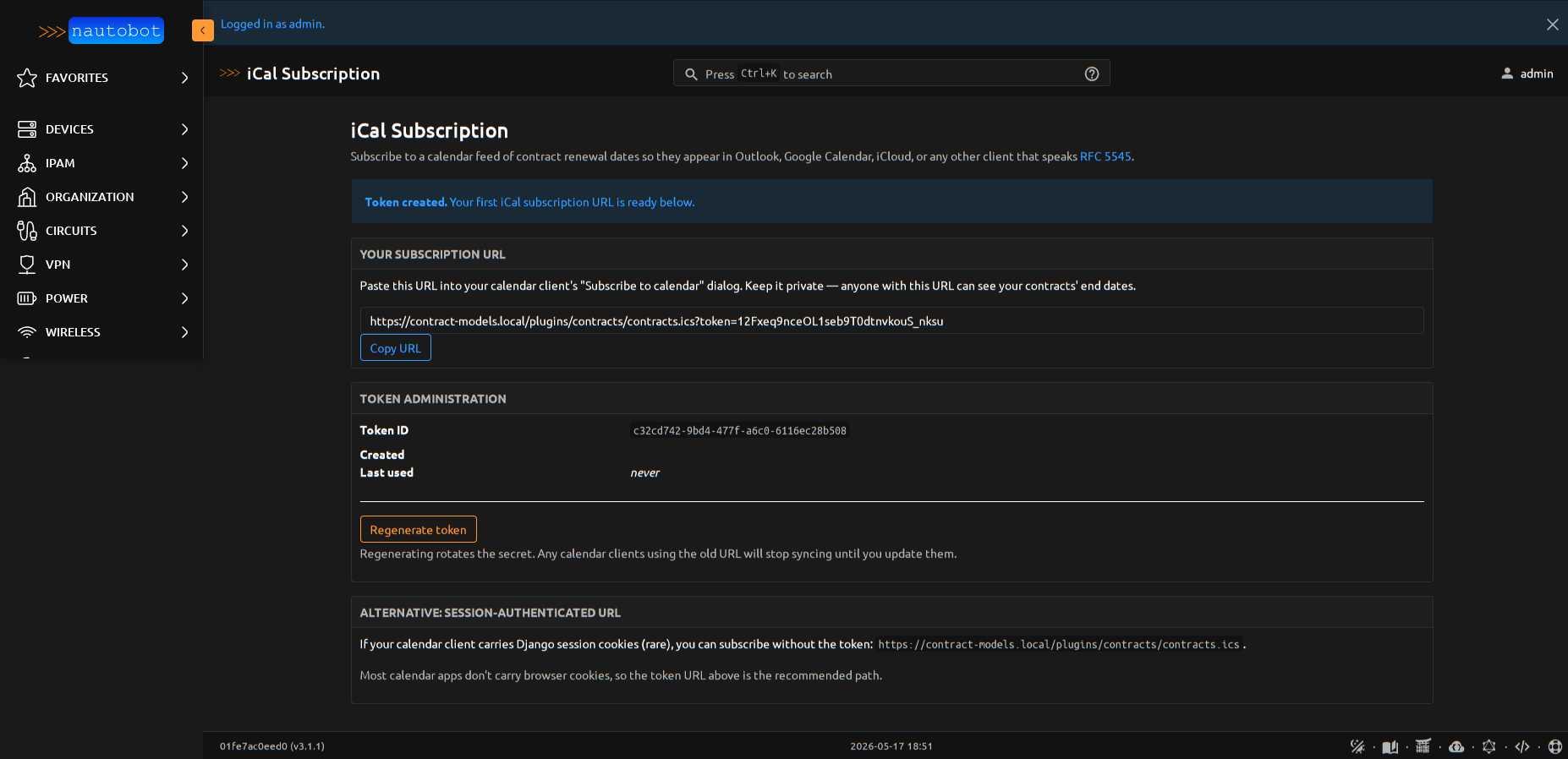
The page auto-creates a 32-character URL-safe token on first visit and shows the full subscription URL with a copy-to-clipboard button. Token administration has a regenerate button (revokes the previous URL and rotates the secret). The feed includes a VEVENT per active contract's end_date, plus a VEVENT for start_date when the contract hasn't yet begun (newly-signed contracts show as upcoming events). Date-only events — no timezone gymnastics; all-day in every calendar client.
Auth: session OR ?token=<secret> URL param. Calendar apps that don't carry browser cookies (which is most of them) use the token URL. The token grants read-only access to contract end dates — it does NOT grant general account access. Treat the URL like a password; regenerate to revoke.
Device-detail Active Contracts panel
Every Device detail page in Nautobot gets an Active Contracts side panel listing the contracts covering that device — direct or transitive (via Tenant, Location, Rack, parent Device).
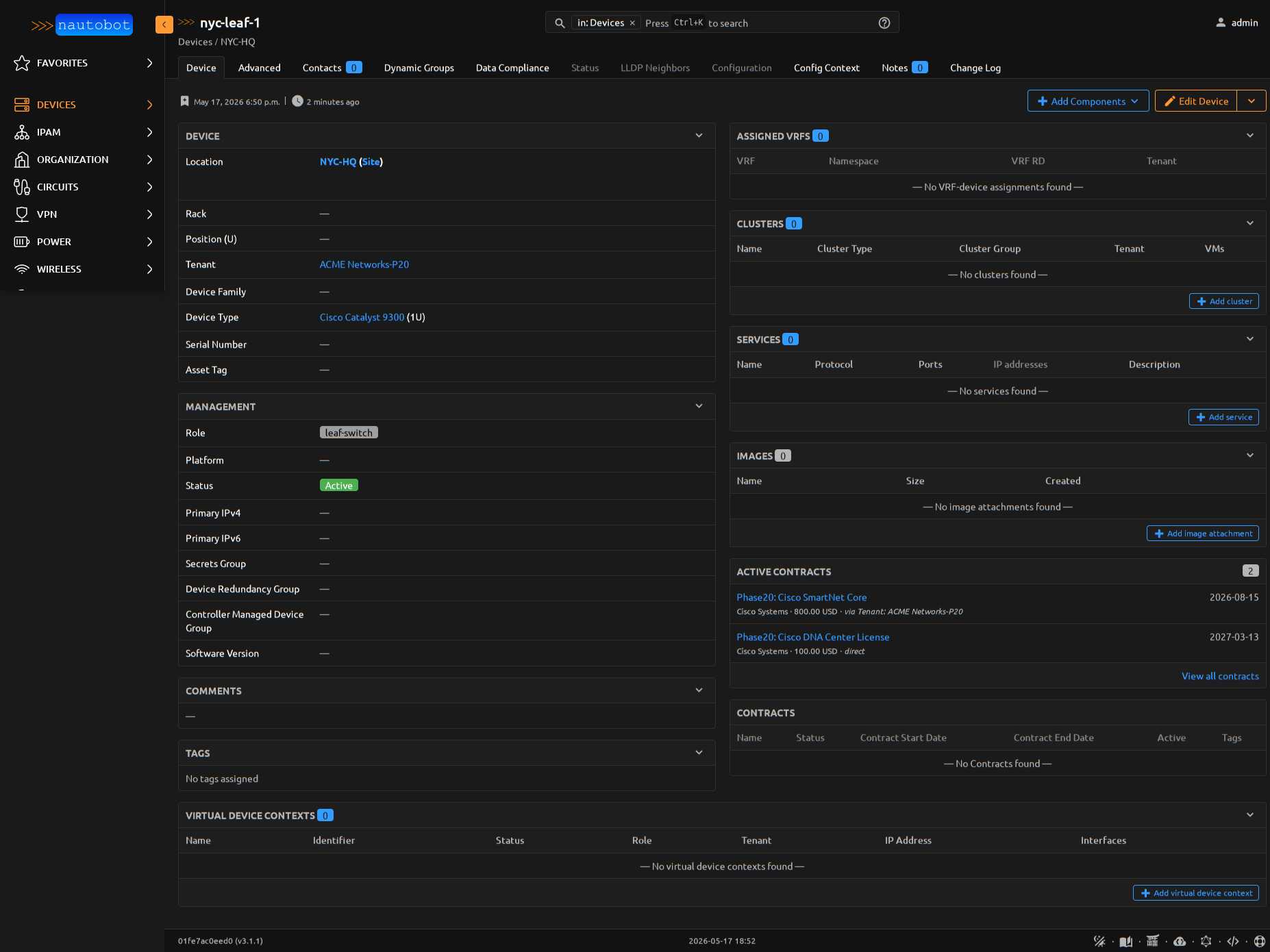
The "Source" column makes the coverage path explicit:
direct—ContractAssignment.content_type == dcim.device, object_id == <this device>via Tenant: ACME Networks-P20— assignment is on the device's tenantvia Location: NYC-HQ— assignment is on the device's location
Operators investigating a Device issue see contract coverage where they already are, without leaving the page. The panel cap is 10 contracts; operators with more drill into the full Contracts list filtered by device.
Vendor Concentration Risk
A home dashboard panel at weight 1525 (between Cost Summary and Renewal Forecast) showing per-currency top-vendor share. Any currency where one vendor exceeds the configured threshold (default 50%, set via PLUGINS_CONFIG['nautobot_contract_models']['vendor_concentration_threshold_pct']) gets an amber risk badge.
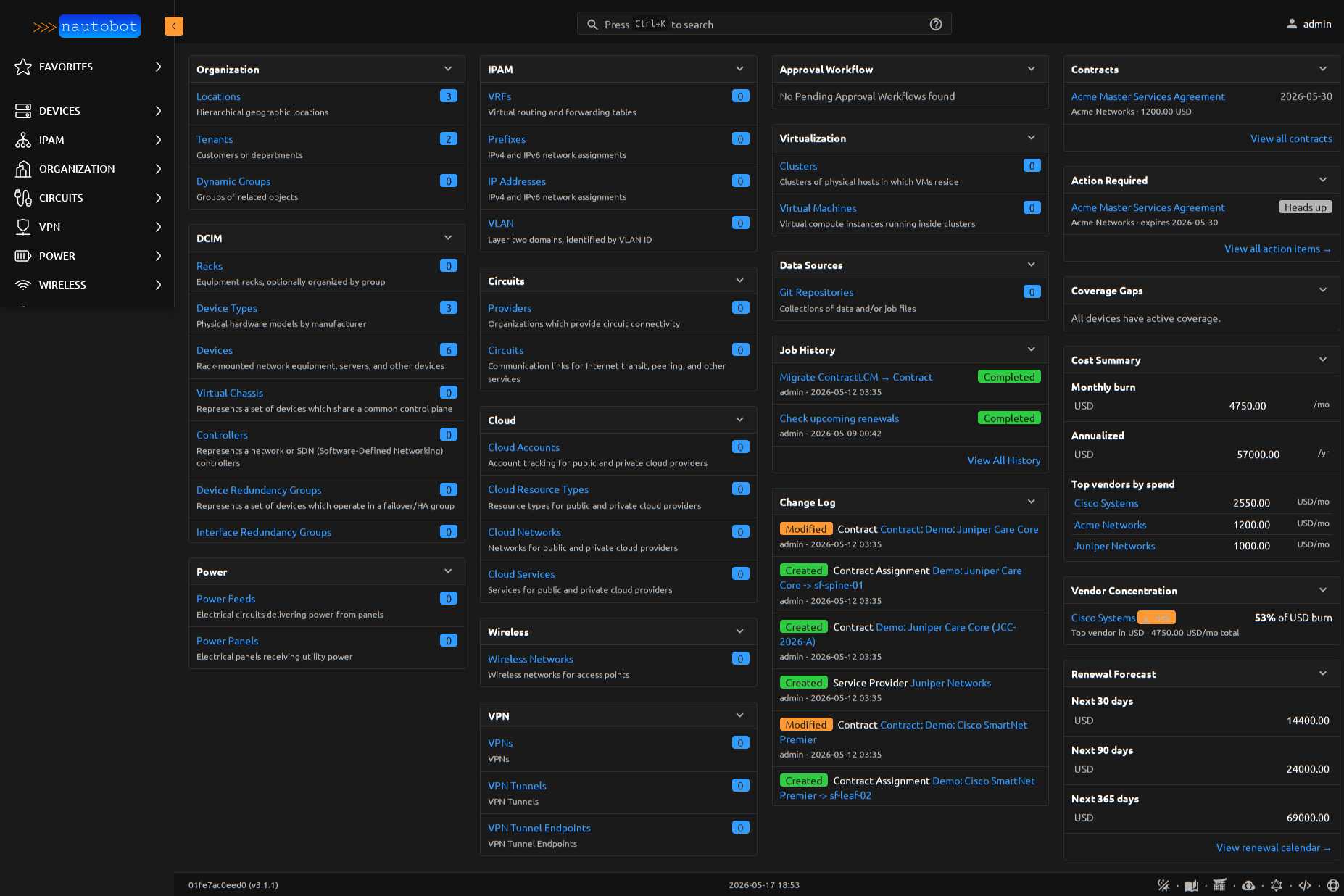
Math is straightforward: top_vendor_total_monthly_spend / total_monthly_burn_for_currency per ISO currency code. Per-currency by design — a vendor concentrated in USD spend is genuinely risky even if EUR spend is diversified across four others. Currencies with zero burn don't appear in the panel.
Operators get a procurement signal at a glance: "you depend heavily on one vendor in
Coverage Drift report
/plugins/contracts/reports/coverage-drift/ surfaces devices that gained or lost contract coverage in a configurable window (7 / 30 / 90 / 180 / 365 days, default 30). Operational regression signal: a contract lapsed, a device got reassigned out from under a contract's coverage path, a renewal didn't transfer cleanly.
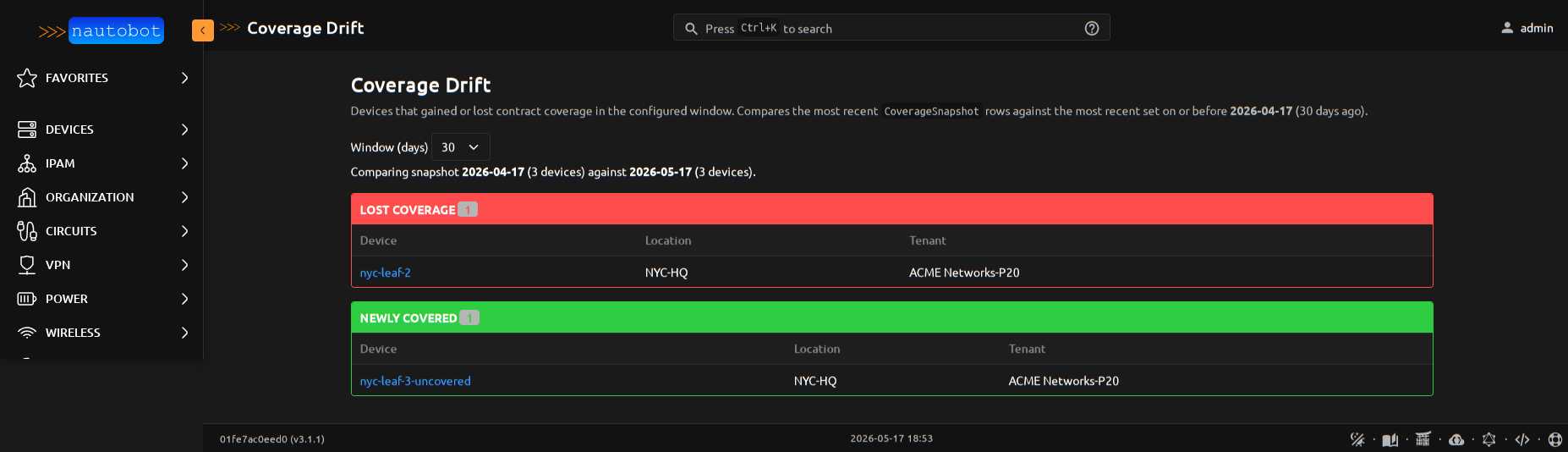
The view diffs the latest CoverageSnapshot row set against the most recent set on-or-before today - window_days. Two sections:
- Lost coverage (red rail): devices that were covered N days ago and aren't now. Click through to investigate.
- Newly covered (green rail): inverse — sanity check that new contracts landed against the expected devices.
Devices that didn't exist in the baseline snapshot are skipped (no comparison point), so adding brand-new devices doesn't generate noise.
Setup: enable the Capture coverage snapshot Job (Apps → Jobs → Contracts) and schedule it weekly alongside the cost-history snapshot. Each run writes one CoverageSnapshot per Device for today's date. With no snapshot history, the report renders an instructional empty state pointing at the Job.